
You can use AI to turn engineering data and calculations into consistent reports by connecting it to the files your team already holds, capturing the numbers once into a checked data set, and redrawing every report from that set instead of rebuilding it by hand. Skyo Digital builds Skyo Core for this purpose, working on top of Excel, PDF, Word and simulation outputs in SharePoint without replacing any of them.
This guide is written for lead engineers, engineering managers and technical directors in Australia, the UK and Europe whose reports are rebuilt by hand every month, study or phase. The question matters now because general AI assistants have made drafting fast, while the harder problems of finding the right numbers, proving where they came from and keeping reports consistent still sit with senior engineers.
Why do engineering reports end up inconsistent?
Engineering reports become inconsistent because the data sits in many places and each issue of a report repeats the same manual cycle. Numbers live in PDF reports, untidy spreadsheets and folders of simulation cases, and every project phase repeats the work of finding the right values, checking they are current, rebuilding plots and rewriting the narrative.
Four problems recur in most engineering teams.
Input data of uncertain origin, so a number questioned late in a study causes rework.
Revisions nobody sees, because a source file changes and nobody knows which plots and reports are affected.
Quality assurance that is hard to evidence, when a client or auditor asks how a figure was derived.
Reports built by hand, which consume senior engineering time on proposals, tender responses and monthly packs.
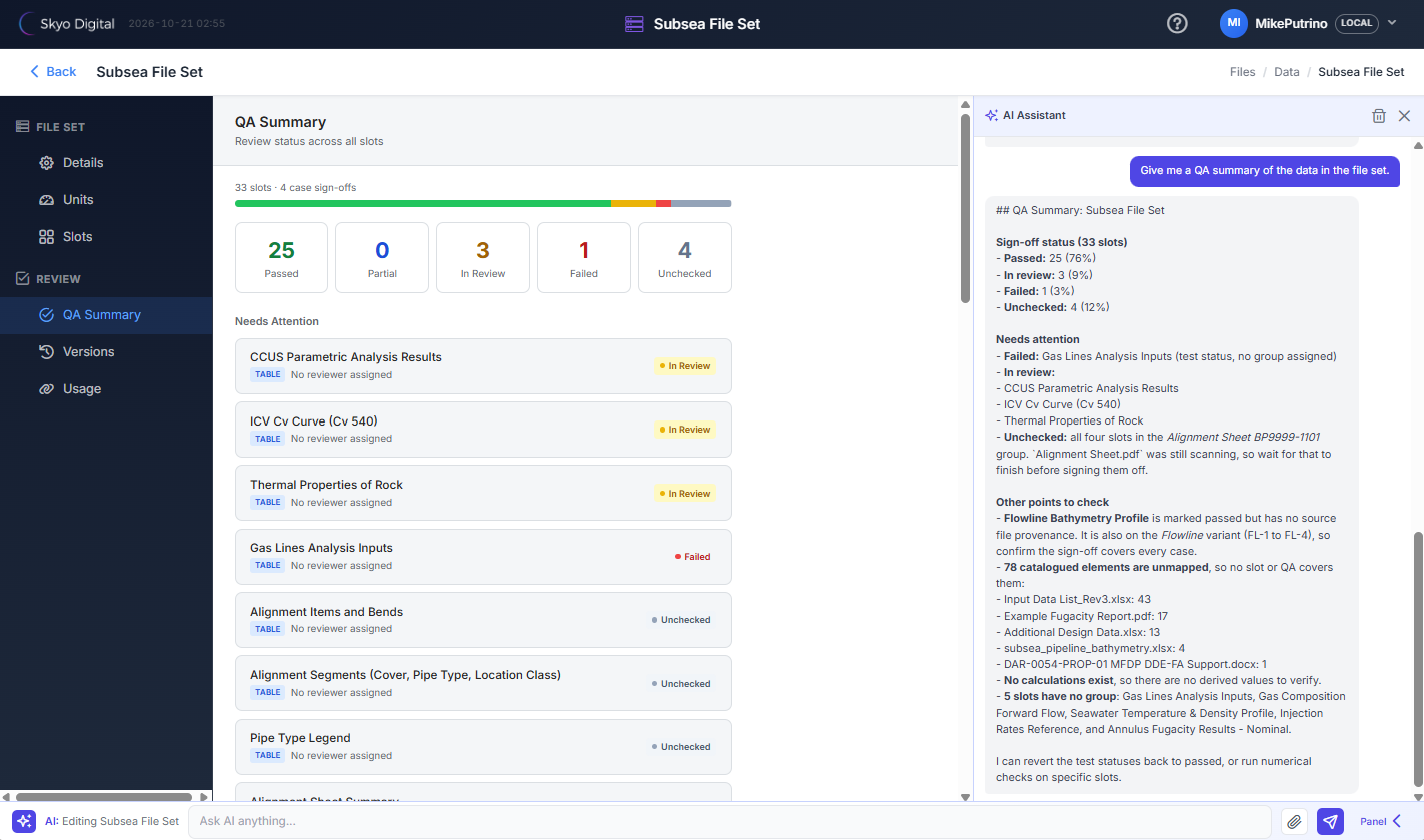
QA summary in Skyo Core enabling auditability and confidence in what’s being reported.
Can AI produce consistent reports without replacing the software you already use?
Yes, provided the AI works on the files and tools you already hold and adds structure around them. Replacing modelling, simulation or calculation software is rarely necessary, because those tools already produce the numbers. The gap is the layer between their outputs and the finished report, which is where an AI reporting assistant belongs.
Skyo Core takes this approach. Engineers link a project folder in SharePoint, Google Drive or another store, nothing is migrated, and there is no duplicate copy of project files. The engineer keeps using Excel, simulation software and Word, and Skyo Core reads what they produce.
The same applies to calculations run in code. Where Python or another tool produces outputs such as CSV, JSON or Markdown files, Skyo Core can manage that data and use it in reports. The calculation stays in the tool that runs it, and Skyo Core brings the result into the File Set with its source, units and QA status, so a script's output is traced and checked in the same way as a spreadsheet or a simulation case.
What are the steps to turn engineering data into a consistent report with AI?
The process has five steps, and the same five steps apply whether the output is a study report, a monthly operations pack or a tender response. Each step leaves a record that the next report can reuse.
Connect: link the project folder where the files already live.
Capture: the AI scans Excel, PDF and Word files, simulation outputs and the files that scripts produce, such as CSV, JSON and Markdown, and finds the tables, and the engineer previews each one and maps what is needed.
Check: the source file, units and QA status of every item are recorded, and changes to a source file are flagged.
Interpret: plot across cases, compare results and draft narrative with the AI assistant, with the engineer checking the output.
Report: reports, presentations and compliance checks draw from the checked data set, so a later issue redraws when the data is updated.
The key idea is that data is selected and mapped once, then reused. A general AI assistant reads whatever files are uploaded to each conversation, so the result depends on the prompt and the same selection is repeated every time.
How do you keep AI-generated engineering reports traceable and checked?
You keep them traceable by recording the source and QA state of every value before it enters a report, and by linking each figure in the report back to that record. Traceability is what lets a reviewer, client or auditor see how a number was derived, which is the part a draft written by an AI assistant alone cannot show.
In Skyo Core the confirmed data forms a File Set, with data grouped into slots that each link to a source file and carry a QA status of passed, partial, in review, failed or unchecked. A QA Summary shows the whole File Set at a glance. Units are visible on every item and can be converted, and items without a source file are called out before sign-off. When a source file is modified, Skyo Core flags it so the engineer can rescan and review the change, rather than discovering later that a plot was out of date.
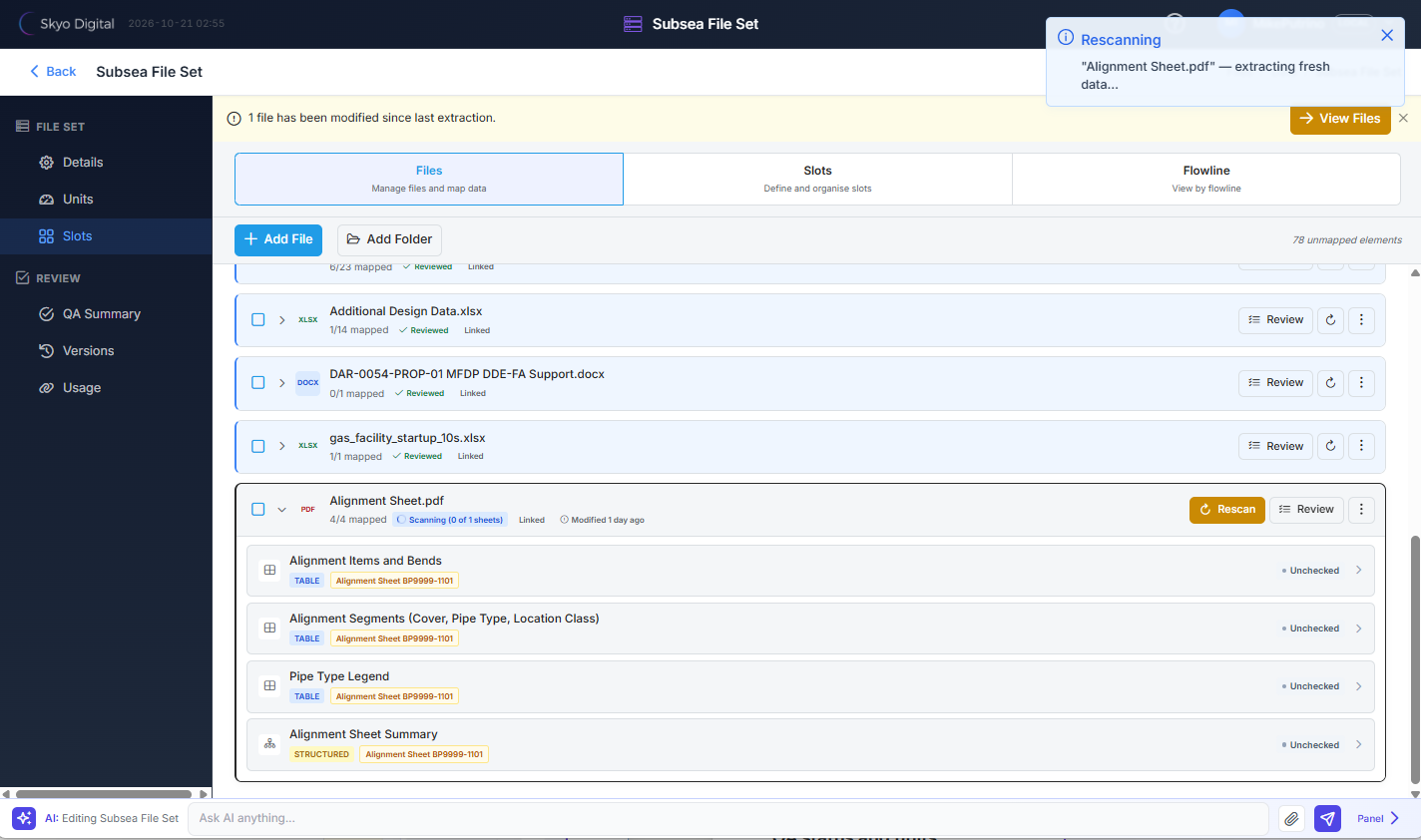
Changes to the underlying data are understood by Skyo Core and notifications to rescan the files are given to the user.
Governance matters as much as the tooling. The Australian Government's Guidance for AI Adoption, published by the National AI Centre, sets out six essential practices covering accountability, understanding impacts, managing risk, sharing information, testing and monitoring, and human control, and engineers remaining accountable for what is issued is consistent with all of them.
How does this work alongside Claude, Copilot and ChatGPT?
Skyo Core works alongside Claude, Copilot and ChatGPT, and gives them the structure engineering work requires. Teams already use an AI assistant for reading and drafting, and Skyo Core adds selection, traceability, revision awareness and QA, so the output can be traced, checked and repeated.
Compared with using an assistant on its own, the differences are practical.
Selecting the right data: files are scanned and mapped once into a File Set that is reused, instead of uploaded to each conversation.
Source traceability: every item links to its source file and location.
Revision awareness: modified files are flagged and can be rescanned.
QA status: recorded per item, with a summary.
Repeatable reports: pages and reports redraw from the File Set when data is updated.
Compliance checking: a structured gap analysis against a tender, scope or requirements marks each item as covered, partial or missing and names the clause.
File Sets are stored in SharePoint and structured so assistants such as Claude can work with them directly.
Where does your data go?
Your data stays in your own SharePoint or approved storage, and you choose how AI processing is handled. Many engineering clients restrict where project files may go, and some prohibit uploading client documents to AI tools, so data handling is agreed before any AI processing begins.
Skyo Core can use Skyo Digital's Amazon Bedrock connection, or a client can connect their own AI models and endpoints, and a model can be changed or removed at any time. The model in use and how data is handled are visible inside Skyo Core. Customer data is not used to train AI models, and it can be deleted on request when a subscription ends.
What does this look like in practice?
Skyo Core started in flow assurance reporting and now serves studies, operations and bids across energy, resources and mining.
Flow assurance and subsea studies
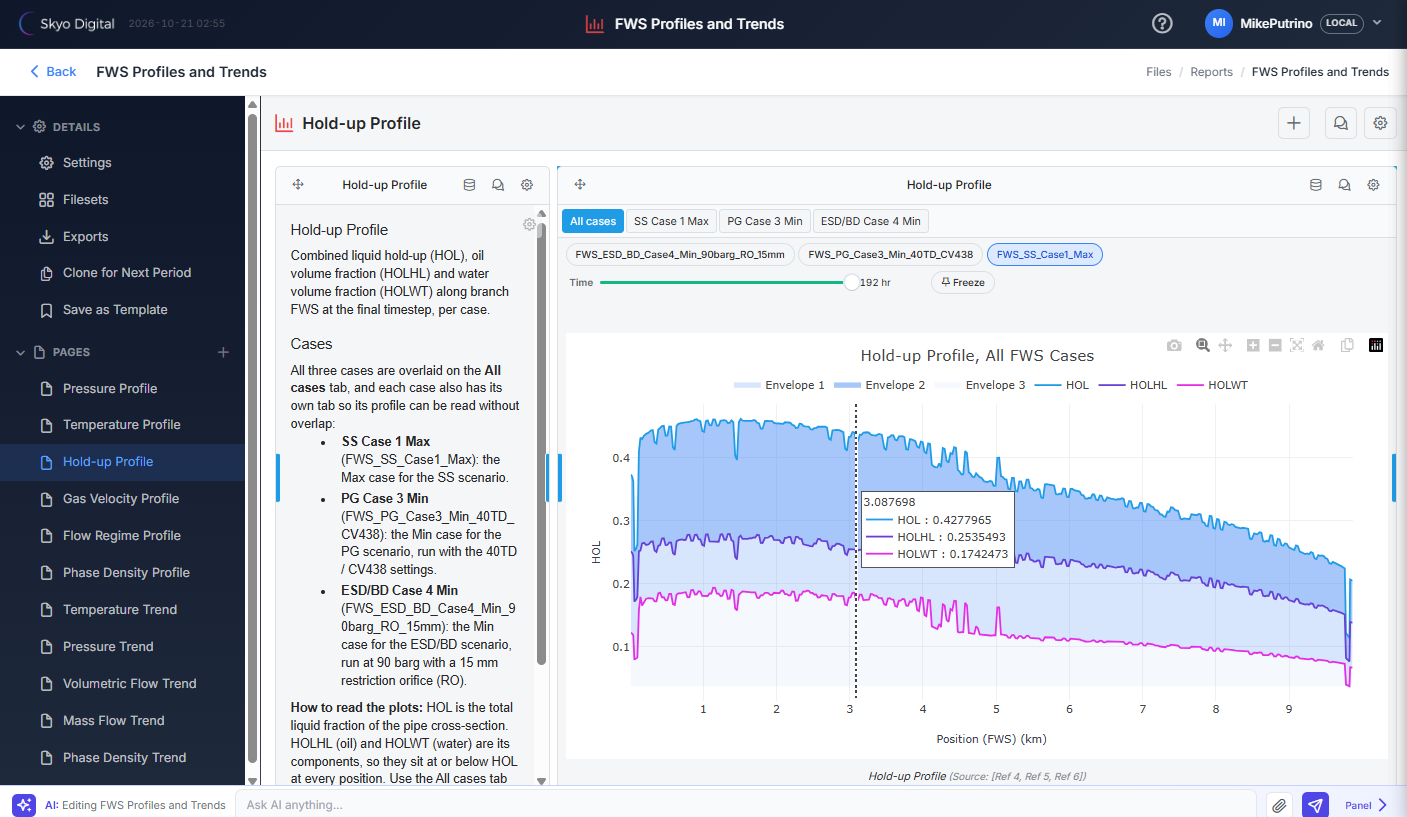
Engineers capture simulation cases, such as OLGA, OrcaFlex or Abaqus results, with recipe packs that create the slots across cases in one step. They check the fluid and hydrate data, plot results across cases with a time slider for transient results, and draft the study report with the AI assistant writing narrative beside each plot. Every plot names the File Set references it draws on.
Tender and RFQ responses
Skyo Core compares the ITT with the proposed scope, finds the gaps and helps assemble the response. Each finding names the ITT section and the part of the response it relates to, and the check can be re-run after edits. The product update on features shipped from client feedback describes the compliance and gap analysis feature in more detail.
An engineering customer in Malaysia
An engineering customer in Malaysia manages simulation data and creates plots in Skyo Core, and the leadership team uses it to write proposals and bids. An Australian operator is evaluating it for operational shutdown packs, a use outside the original design that shows how widely the pattern applies.
Monthly operations reports
Teams that rebuild the same report every month can bring raw production files and simulation results into one view, then redraw the report from updated data with the same traceability each time.
How do you get started, and what does it cost?
You start with a demonstration on sample data, then run a paid pilot on your own project data with agreed success measures, and move to an annual licence if it delivers. The pilot lets a team test the approach on real files before committing.
Skyo Core is priced as one flat annual fee with unlimited licences across an organisation, with no per seat charges. Additional features requested by customers are built and priced as part of the engagement.
How Skyo Digital can help
Skyo Digital is an engineering-led AI and technology consultancy with a head office in Perth, Western Australia, and we build Skyo Core with a team of more than 20 Australian-based developers working alongside our engineers. We work with engineering teams in Australia, the UK and Europe to automate reporting inside the tools they already use, and our digital transformation for engineering service covers the wider roadmap. Tell us the report your team rebuilds every month, and we will show how it could redraw from a checked data set.
Frequently asked questions
Do we need to replace our engineering software to use AI for reporting?
Your engineering software stays in place. Skyo Core works on top of the Excel workbooks, PDF reports, Word documents and simulation outputs your team already produces, held in SharePoint, Google Drive or another project store. Nothing is migrated and no duplicate copy of project files is created, so engineers keep using the tools they know.
How do you make sure the numbers in an AI-written report are correct?
Every value is captured into a File Set with a link to its source file and a QA status recorded by the reviewing engineer. Units are visible and convertible, items without a source are flagged before sign-off, and a QA Summary lists what still needs checking. The AI drafts narrative and the engineer checks it, so people remain accountable for what is issued.
Can the same report be produced again each month or phase?
Yes. Reports and presentations link to File Sets, so pages and plots redraw from the File Set when the data is updated. If a source file changes, Skyo Core flags it so the engineer can rescan and review before the next issue. This gives monthly operations reports, study phases and shutdown packs the same traceability each time.
Can Skyo Core use results from Python scripts or other calculation tools?
Yes. Where Python or another tool produces outputs such as CSV, JSON or Markdown files, Skyo Core can manage that data and use it in reports. The calculation stays in the tool that runs it. Skyo Core maps the output into a File Set with its source, units and QA status, so the figures in a report trace back to the script's output file.
Where is our data stored and can AI models be changed?
File Sets are stored in your own SharePoint or approved storage. AI processing can use Skyo Digital's Amazon Bedrock connection or your own models and endpoints, and a model can be changed or removed at any time. Customer data is not used to train AI models and can be deleted on request when a subscription ends.
If your team rebuilds the same engineering report every month and you want to see how it could draw from a checked data set, email info@skyodigital.com or book a Skyo Core demonstration.
